https://github.com/DraconInteractive/Dracon.Embedded.Bertie
Overview
Bertie was a project for me to expand my robotics research further, and also to look into showing humanoid behaviours / personality through a robotic interface.
The final product consists of an ESP32 devkit with an e-ink display, a microphone, a standard button and an IR positioning sensor. The entire thing sits on an aluminium chassis with 2 servos for rotation.

Servos
The initial challenge for this project was my own knowledge of circuitry. I had worked with various Arduino modules previously, however they are all generally rated for 3-5v, which is the output voltage of the chip itself. No math to do there!
Integrating the servo’s however, required my to figure out how to balance the voltage and ampere requirements of the servos, but also power the minor components.
I ended up separating the two into two different power rails. The servo’s are powered by a battery with 4x AA batteries, and the minor components are powered from the ESP32 (which is powered from a USB-C)
Unfortunately, this experimentation came at a cost: mid-project I burnt out a few components such as the e-ink display before I learnt my lesson.
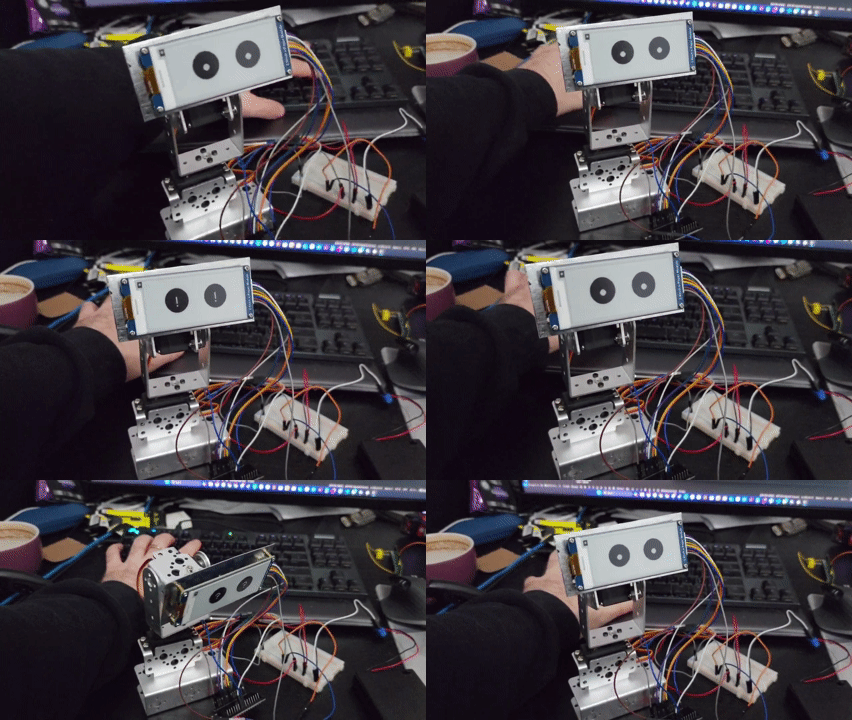
However, the results were a functioning 2-DOF rotation!
Communication
The robot itself uses an ESP32 devkit, and I have programmed it using an Arduino backend and C++. This is a relatively straightforward process, since platformIO gives all the necessary tools for flashing etc.
However, I didn’t want the decision logic for the robot to sit on the ESP32 chip. The chip has limited capacity, and I wanted to be able to control the robot remotely. The overall concept was that the ‘brain’ is a server that the robot connects to. The robot forwards its sensor readings and current state, and the server provides instructions for actions to take.
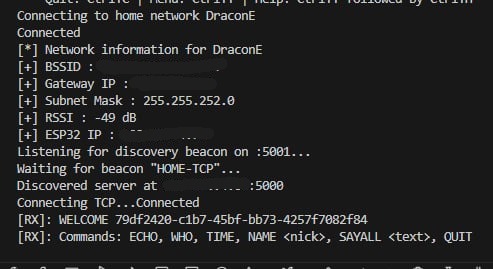
I programmed the server in C#, using a basic console application. The server accepts TCP connections from clients (like the robot). The client registers its unique ID, and its type. This allows for persistent data storage across sessions. This is an example of the robot connecting, registering its unique ID and receiving back and list of possible commands.
I also created a python server alongside the main C# server. This served a very specific purpose of receiving a stream of microphone data from the robot, and sending it to a speech-to-text transcription service. This is returned to the server which then instructs the robot based on that data. I attempted to replicate the functionality of this in C#, however in the end I found it easier to spawn an instance of the py server and link it per session that to have all the functionality sit in the core C# server.
The result of this is that the user can press and hold the button at the base of the robot, speak, and then have the robot take an according action.
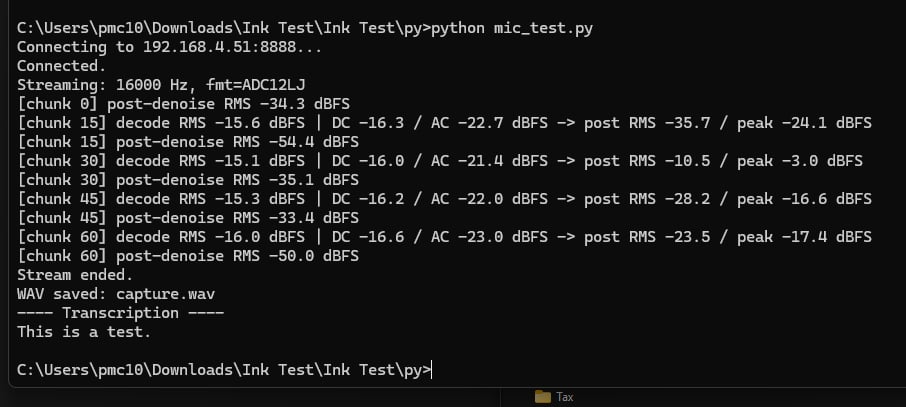
This is a screenshot from my initial tests running the py server with data coming from the robots microphone:
Embedded Logic
Finally, with a server to talk to and each component individually created, we can go over the primary loop logic.
First we handle connection and disconnection from the C# server.
  WiFiClient newClient = server.available();
  if (newClient && newClient.connected())
  {
    activeClient = newClient;
    hasClient = true;
    Serial.println("Client connected");
    activeClient.flush();
    displayServerState(false, true, hasClient, lastMessage);
  }

  if (hasClient && !activeClient.connected())
  {
    hasClient = false;
    activeClient.stop();
    displayServerState(false, true, hasClient, lastMessage);
  }
Once we are connected we can check our current button status, and perform the logic for if the button gets held down. This uses a basic state machine with states ‘Idle’ or ‘Recording’
As an overview, if the button is pressed while the state is idle, it will begin a stream to the python server and send details of the incoming data. It will set the state to recording and enable the microphone ADC on the chip.
When the button is released, and the state is recording it will disable that ADC and send the stream end header to signal the end of data transmission. If the state is recording and the button is still held it will stream the latest chunk of microphone data to the py server.
  bool btnHeld = digitalRead(BTN_PIN) == LOW;

  if (activeClient && hasClient) {
    switch (recState) {
      case Idle:
        if (btnHeld)
        {
          Serial.println("Starting stream");

          // Begin stream header
          activeClient.println("MIC_STREAM_BEGIN");
          activeClient.print("sr=");
          activeClient.println(I2S_SAMPLE_RATE);
          activeClient.println("fmt=ADC12LJ");
          activeClient.flush();

          i2s_adc_enable(I2S_PORT);
          recState = Recording;

          lastFlushMs = millis();
          chunksSinceFlush = 0;
        }
        break;
      case Recording:
        if (!btnHeld || !hasClient)
        {
          i2s_adc_disable(I2S_PORT);
          if (hasClient)
          {
            Serial.println("Ending stream");
            activeClient.println("MIC_STREAM_END");
            activeClient.flush();
          }
          else {
            Serial.println("Lost client, ending stream");
          }
          sendHomePacket("ARM MIC");
          recState = Idle;
        }
        else {
          processMic();
        }
        break;
    }
With microphone data sorted, I can then check for messages incoming from the server. This is parsed using a basic command system and performed by the robot.
if (recState == Idle && activeClient.available() > 0)
    {
      String incoming = activeClient.readStringUntil('\n');
      incoming.trim();
      lastMessage = incoming;

      Serial.println("---");
      Serial.print("Data received: ");
      Serial.print(lastMessage);
      Serial.println();

      displayServerState(false, true, hasClient, lastMessage);

      displayEyesSymbol("!", true);
      delay(500);

      parseLastMessage();

      displayEyes(0);
    }
  }
The final piece of logic is incomplete at this time. I want to make the robot use a kinematic solution to ‘follow’ an IR LED. My plan is to place that LED on a necklace, so the robot can track the users position.
For now, I have confirmed that this code gives me an accurate x/y position for an IR source, however this was using a TV remote as the necklace is not functional yet.
if (recState == Idle) {
    // IR cam poll at ~66 Hz
    if (millis() - ir_last_ms >= IR_PERIOD_MS) {
      ir_last_ms = millis();
      if (ir_read_frame()) {
          if (IRx[0] != 1023 || IRy[0] != 1023) {
            Serial.printf("IR: (%d,%d)\n", IRx[0],IRy[0]);
          }
      }
    }

    if (checkForHomeIncoming(homeIncoming)) {
      Serial.print("Home incoming: ");
      Serial.println(homeIncoming);
    }
  }
In Conclusion
I hope the above is interesting! It is an ongoing project, and I hope to have even more fun progress to report on
 Peter Carey
Leave a comment