https://github.com/DraconInteractive/Dracon.Frontend.CoreChatTerminal
Overview
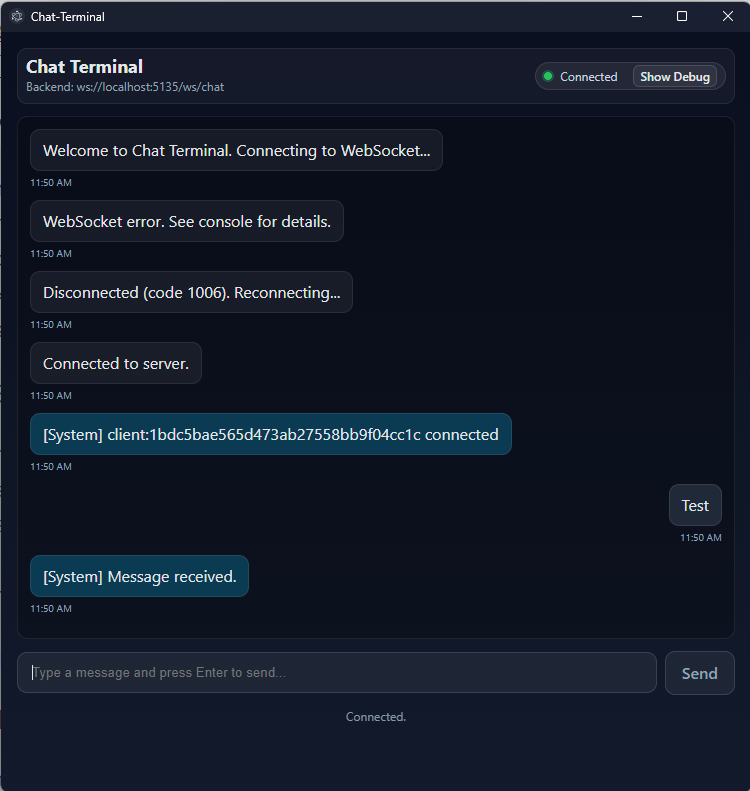
Chat Terminal is a React – TypeScript – Electron desktop client that communicates with a C# backend via WebSocket. It provides a modular UI and a built-in Debug panel exposes the wire so you can diagnose issues in minutes.
Contents
Features
Chat UI
The primary feature of the app. A scrollable message view that displays parsed versions of incoming messages including message content and the role of the sender.
You can send your own message with the input box and send button (or Enter), and it will auto-scroll to latest message as needed.
WebSocket Engine
Connects to the C# backend server. Connection guarding protects against double connects, and with auto-reconnect as needed.
Connection status is displayed at the top of the chat for clear communication.
Diagnostics
This app is made for developers! This means an easily accessible debug panel at the top of the app that shows Rx count, duplicate detection and a rolling packet log with up to 200 entries.
Architecture Overview
App.tsx
The primary component, this owns the connection lifecycle, message state and debug logic.
Components
- HeaderBar: title, backend URL, connection badge, debug toggle, reconnect.
- InputBar: text input with Enter-to-send and Send button.
- MessageRow: one message bubble.
- DebugPanel: counters and raw log with clear button.
- ErrorBoundary: catches render errors with a fallback UI.
Code Samples
StrictMode-safe WebSocket lifecycle
useEffect(() => {
    unmountedRef.current = false;
    connect();
    return () => {
        unmountedRef.current = true;
        clearReconnectTimer();
        const s = socketRef.current;
        if (s && (
           s.readyState === WebSocket.OPEN ||
           s.readyState === WebSocket.CONNECTING))
           {
               try { s.close(1000, "unmount"); } catch {}
           }
        socketRef.current = null;
    };
}, []);

function connect() {
    if (socketRef.current && (
         socketRef.current.readyState === WebSocket.OPEN ||
         socketRef.current.readyState ===
             WebSocket.CONNECTING))
    {
      return;
    }
    setConnState("connecting");
    const ws = new WebSocket(WS_URL);
    socketRef.current = ws;

    ws.onopen = () => {
        setConnState("connected");
        retryCountRef.current = 0;
        clearReconnectTimer();
        pushSystem("Connected to server.");
    };

    ws.onclose = (ev) => {
        // don’t reconnect if we’re intentionally unmounting
        if (unmountedRef.current) return;
        setConnState("disconnected");
        pushSystem(`Disconnected${ev.reason ? ": " + ev.reason : ""} (code ${ev.code}). Reconnecting...`);
        scheduleReconnect();
    };
}
Packet Parsing
ws.onmessage = (ev) =>
{
    const raw = typeof ev.data === "string" ?
                ev.data : tryDecodeBlob(ev.data);
    let parsed:
    {
        sender?: string;
        id?: string;
        text?: string;
        ts?: string
    } | undefined;
    let displayText = raw;
    let key: string | undefined;

    try {
        const obj = JSON.parse(raw);
        if (obj && typeof obj === "object")
        {
            const sender = obj.sender != null ?
                           String(obj.sender) : undefined;
            const id = obj.id != null ?
                           String(obj.id) : undefined;
            const text = obj.text != null ?
                           String(obj.text) : undefined;
            const ts = obj.ts != null ?
                           String(obj.ts) : undefined;
            parsed = { sender, id, text, ts };
            if (sender && text)
            {
              displayText = `[${capitalize(sender)}] ${text}`;
              key = `${sender}|${text}|${ts ?? ""}`;
            }

            // Retrieve client ID
            if (!myClientIdRef.current &&
                 sender &&
                 sender.toLowerCase() === "system" &&
                 text)
            {
                const m = text.match(
                          /client:([a-f0-9]+)\s+connected/i);
                if (m && m[1]) myClientIdRef.current = m[1];
            }
        }
    } catch { /* non-JSON frames are shown raw */ }

    // Duplicate detection (mark, don’t drop)
    if (key) {
        const seen = seenKeysRef.current;
        if (seen.has(key))
        { /* mark as duplicate */ }
        else
        { seen.add(key); }
    }

    // Suppress only our own echoed frames
    const senderLc = parsed?.sender ?
                     String(parsed.sender).toLowerCase()
                     : undefined;
    const isSelfEcho = !!(senderLc === "client" &&
                          parsed?.id &&
                          myClientIdRef.current &&
                          parsed.id ===
                              myClientIdRef.current);
    if (isSelfEcho) return; // don’t append to chat
  };
Roadmap
This project is in active development right alongside the # counterpart. Some ideas for the future:
Server-issued message id
Currently duplication detection comes by looking at client id and timestamp. Unique id’s for messages can help cache and parse them without all the extra logic.
Debug Log mode switch
The debug log currently show raw json input. I’d like to add some more modes to switch between different parsing views
History Request
The chat history is wiped between every session. I’d like to add a history request that returns back the last x amount of messages so that the recent history can be provided to the chat and populate it.
 Peter Carey
Leave a comment