Title: Senior Game Developer
Languages: C#, C++, Python, Rust
Tools: Unity 3D, Unreal Engine, React, Electron, Vue
Key Concepts: Tech Art, Frontend, Backend, Systems Architecture
CI/CD pipelines (GitHub Actions, BuildKite)
UI/UX design and implementation
UBF is a platform agnostic collection of systems and tooling for creating node-based blueprints for the rendering of composable assets in 3D experiences.
A comprehensive overview of UBF can be found here. The following is a very simple overview of the key concepts.
First, the UBF Studio. This program allows you as the user to create your ‘blueprints’. A blueprint is a node-based graph that encodes the series of actions required to render your asset.
These nodes might include functions like “SpawnModel”, “ApplyMaterial” or “CreateSceneNode”.
Using these nodes correctly, the user can spawn a series of models, apply the correct textures and materials, and even parent / retarget animation for humanoid models and accessories.
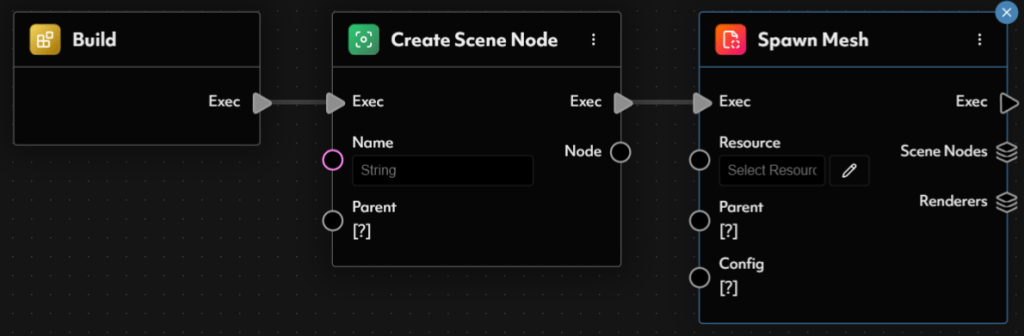
Blueprints have their own variable management, allowing the user to inject values into them at runtime. Blueprints may also call other blueprints, allowing for values to be chained and transformed as they proceed down the blueprint flow.
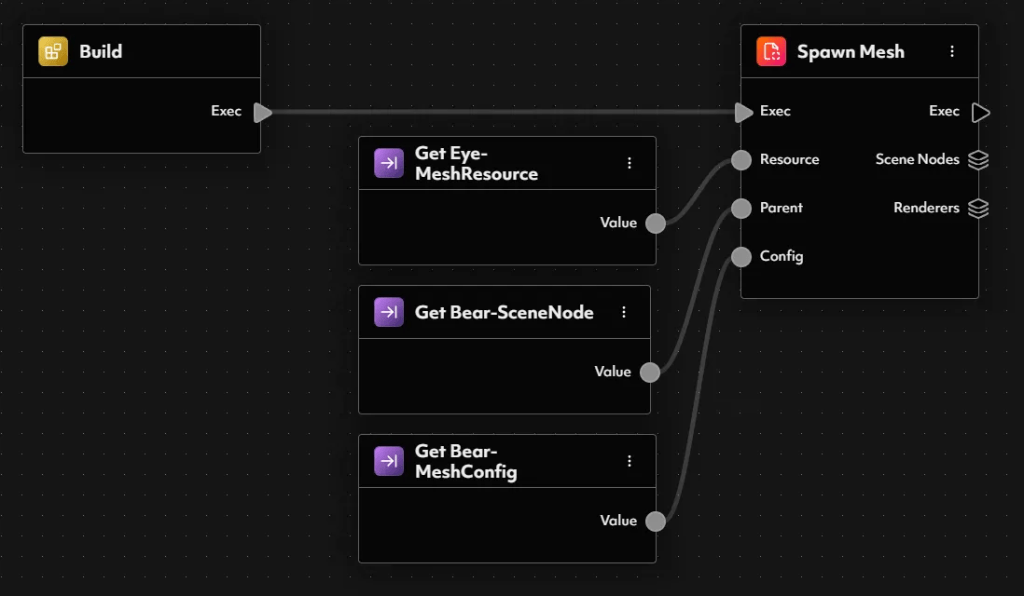
Once you have a graph, it may be ‘interpreted’ by an interpreter SDK. Currently SDK’s exist for Unity and Unreal game engines. An example of implementing the UBF SDK in Unity can be found in the Integration Demo.
When interpreting a graph, the experience generally requires not only the blueprint itself, but a catalog of the resources it will require (.glb and .png files). When using the Futureverse Execution Controller, a premade system is put in place that allows for the user to host their blueprints and resources and simply provide a root url to the interpreter.
The UBF Previewer is a tool that renders blueprints in a fully local fashion for testing. It exposes blueprint inputs and renders the asset for your viewing like so.

 Peter Carey
Leave a reply to Studio – Peter Carey Cancel reply